

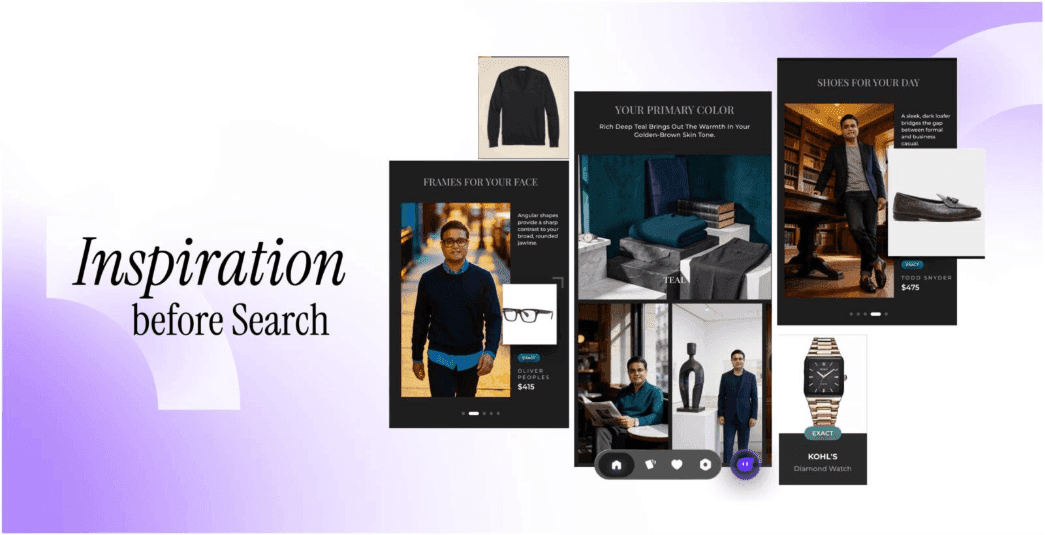
What Is Lynk? The AI Shopping Agent That Lives on Your Home Screen
TL;DR
Lynk is a personal AI shopping agent by Glance, available to AT&T Android customers as a floating button on your home screen. It works on top of any shopping app you are already using — no switching apps, no losing context, no new tab. Four capabilities: Visual Search, Virtual Try-On, Mix and Match, and Agentic Chat. Free, no setup, no subscription.
Every shopping app currently asks you to leave. You find something on Instagram, you have to open a browser. You see a look on TikTok, you lose it the moment you switch. You want to try something on, you download another app. You want to ask a question, you open ChatGPT in a separate window and describe a product you can no longer see.
The tab-hopping is not a minor inconvenience. It breaks the decision. By the time you have done the research, the moment — and the excitement — is gone.
Lynk is built around a different idea. The help should come to you, where you already are.
What Is Lynk?
Lynk is a personal AI shopping agent that lives on your AT&T Android home screen as a small floating button — always there when you need it, out of the way when you don't.
Tap it any time you are shopping — in any app, on any website, or from your photo gallery — and Lynk opens on top of whatever you are already looking at. No switching. No losing your place. The help arrives where you already are.
Lynk is available free to AT&T Android customers. No subscription. No setup required.
What Lynk Can Do: Four Capabilities
Visual Search — Find it from a photo
See something you want? Snap your screen or upload any photo from your gallery. Visual Search finds matching and similar products instantly — wherever you saw it, whatever it is. Turn any image into a shopping list in seconds.
Virtual Try-On — See it on you, not the model
Upload one selfie and Lynk shows you wearing the look — not a generic model, the actual you. Virtual Try-On lets you judge fit and style before you spend a cent. Shop with confidence, return less.
Mix and Match — Complete the outfit
Found a piece you love but stuck on the rest? Mix and Match takes whatever you are viewing and builds a complete outfit around it — shoes, bag, jacket, all shoppable. Like having a stylist who finishes the look for you.
Agentic Chat — Describe what you need
Sometimes you know exactly what you are looking for but not what it is called. Describe it in plain words — Agentic Chat understands the occasion, the vibe, the constraints, and builds a complete styled shoppable look in one conversation. Want it more casual? In navy? Just ask. It refines until it's right.
How Lynk Differs from Amazon Rufus, Google Lens, and TikTok Shop
The difference is not the capability. It is the model.
Every other tool makes you go to it. Amazon Rufus lives inside the Amazon app — you open Amazon, you search, it responds. Google Lens requires you to open the Google app or camera. TikTok Shop is inside TikTok. Each one is a destination you have to navigate to, which means leaving whatever you were looking at.
Lynk is an overlay. It comes to you. The floating button sits on top of your home screen and opens on top of any app. You never leave the product page, the social post, or the article you were reading. The context stays. The decision gets easier.
| Amazon Rufus | Google Lens | TikTok Shop | Lynk | |
| Where it lives | Amazon app only | Google app or camera | TikTok app only | Home screen — on top of every app |
| Do you have to switch apps? | Yes | Yes | Yes | No — overlay model |
| Works on any shopping app? | No | No | No | Yes |
| Works from your photo gallery? | No | Partial | No | Yes |
| Visual Search | No | Yes | No | Yes |
| Virtual Try-On | No | No | No | Yes |
| Outfit building | No | No | Partial | Yes — Mix and Match |
| Plain language requests | Partial | No | No | Yes — Agentic Chat |
| Free | Free (Amazon account) | Free | Free (TikTok account) | Free — no account needed |
For a deeper look at how ChatGPT compares as a fashion tool and why conversational AI is structurally different from an agentic shopping overlay, that comparison is covered separately.
Availability
- Available to: AT&T Android customers
- How to access: Floating button on your Android home screen — no download required for eligible devices
- Works on: Any shopping app, any website, your mobile photo gallery
- Cost: Free. No subscription. No setup required.
Privacy
The images you upload or share on your screen are never shared with any third party. They are used only to personalise recommendations and visualise you in AI-generated outfit looks.
Lynk does not require you to create an account or share payment information. When you tap to buy, you go directly to the brand's own website — your purchase data stays with the original retailer.
FAQs
How does an AI shopping agent on my home screen work?
Lynk lives on your AT&T Android home screen as a floating button. Tap it any time — from any app, any website, or your photo gallery — and it opens on top of whatever you are already looking at. You do not leave the page. You do not lose context. From there, you can search by image, try on a look using your selfie, build a complete outfit around a piece you found, or describe what you need in plain words and get a complete styled shoppable look. When you are ready to buy, tap any item to go directly to the brand's site.
What is the best AI shopping agent for Android?
For AT&T Android customers, Lynk by Glance is the most capable AI shopping agent available on the home screen. It is the only tool that combines visual search, Virtual Try-On, outfit building, and plain-language shopping in a single floating button that works on top of every app you already use. Amazon Rufus is strong for product search within Amazon. Google Lens is strong for image-based product identification. Lynk is the only one that does all four without requiring you to switch apps or leave the page you are on.
How is Lynk different from Amazon Rufus?
Amazon Rufus lives inside the Amazon app and surfaces products from Amazon's catalog when you ask. It is reactive: you go to it, open Amazon, type a query, and it responds. Lynk lives on your home screen as a floating overlay and works on top of any shopping app — not just one retailer's catalog. You do not have to leave what you are already looking at. Lynk also does things Rufus does not: virtual try-on using your selfie, complete outfit building from a single piece, and plain-language styling requests that return a full shoppable look rather than a product list.
Is there an app that lets me shop without leaving what I'm already looking at?
Yes — Lynk. It is designed specifically for this. The floating button lives on your home screen and opens on top of any app you are using — Instagram, a brand website, a shopping app, anywhere. You never have to switch. See something in one app, tap Lynk, search by image, and find it or something similar — without leaving the first app. This is the overlay model: the help comes to where you already are rather than asking you to go somewhere else.
How do I get an AI shopping agent on my AT&T Android phone?
If you are an AT&T Android customer, Lynk is available from the week of June 17-20, 2026. The Lynk floating button appears on your Android home screen. Tap it to access Visual Search, Virtual Try-On, Mix and Match, and Agentic Chat — on top of any shopping app you are already using. Free, no subscription, no setup required.
What is a visual search shopping app?
A visual search shopping app lets you search for products using a photo rather than a text query. You snap a screenshot, upload an image from your gallery, or point your camera at an item — and the app finds matching or similar products across online retailers. Lynk's Visual Search works from any image on your phone. Google Lens also does image-based product search but requires you to open the Google app. Lynk works as a floating overlay on top of any app you are already in — no switching required.
Can I try on clothes virtually without opening a separate app?
Yes — with Lynk's Virtual Try-On. Tap the Lynk floating button from any shopping app, upload one selfie, and see yourself wearing the look — not a generic model, the actual you. Lynk opens as an overlay on top of whatever you are already looking at, so you never leave the product page. No separate app to download. No account to create. Available free to AT&T Android customers.
Download the Glance app now





Your intelligent
shopping agent.







Your intelligent
shopping agent.